Slide 1 of 21
 Nanoscale · Module 16
Scientific Visualization for Connectomics
Teaching Deck
Human cortex · H01
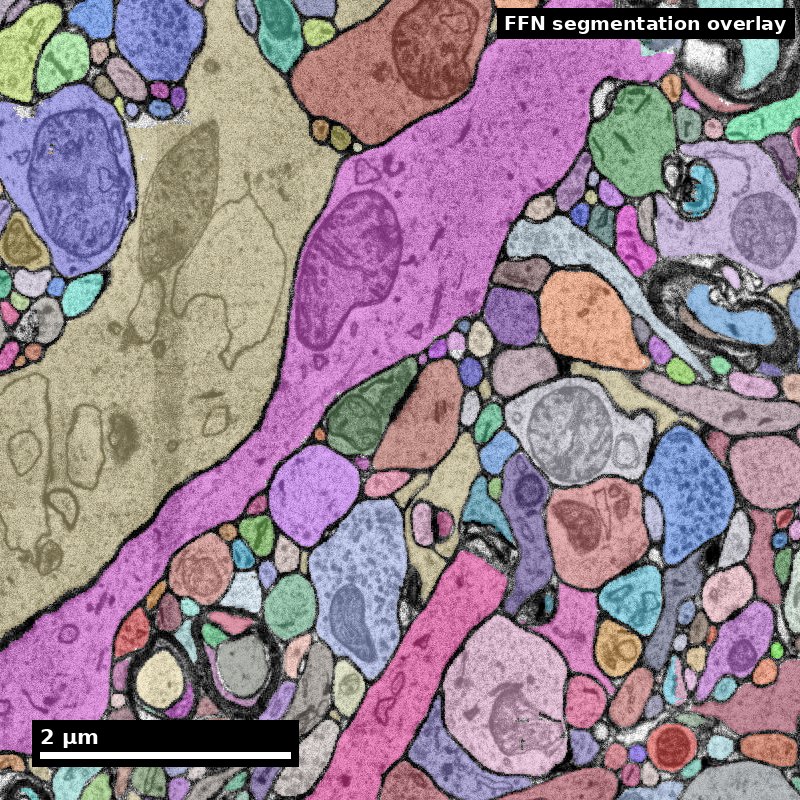
Object segmentation over electron microscopy
H01 release · Lichtman Lab / Harvard & Connectomics at Google · CC BY 4.0
Shapson-Coe et al. (2024) · doi:10.1126/science.adk4858
Slide 2 of 21
Learning Objectives
- Select visualization forms aligned to analytical intent
- Encode uncertainty and quality signals explicitly
- Avoid misleading visual encodings in dense connectomics data
- Produce publication-ready and presentation-ready figures
Slide 3 of 21
Capability Target
Produce a figure set that communicates connectomics findings accurately, including uncertainty and data-quality context, for both expert and mixed audiences. Students will leave this module able to choose the right visualization form for a given scientific claim, build publication-quality figures using standard tools, and defend every design choice in terms of clarity and honesty.
Slide 4 of 21
Concept Focus
1) Visualization as communication, not decoration
- Technical: every visual encoding (position, color, size, shape, opacity) carries information.
- Plain language: a figure should help people understand your result, not impress them with complexity.
- Misconception guardrail: making a figure "look good" is not the same as making it truthful. A beautiful 3D rendering with no scale bar and no uncertainty indicators is worse than an ugly but complete 2D plot.
Figure description and teaching notes
Further teaching detail from the module:
**Technical:** every visual encoding (position, color, size, shape, opacity) carries information. Encodings that do not map to data dimensions are noise. The goal of a scientific figure is to make the reader's correct interpretation as effortless as possible.
Slide 5 of 21
Core Workflow
- Map each claim to required visual evidence. For every result sentence, identify what figure panel and what visual encoding will support it.
- Select the appropriate plot type. Use the decision framework: topology questions get node-link diagrams or matrices; quantity questions get heatmaps or bar charts; spatial questions get renderings; distribution questions get histograms or violins.
Slide 6 of 21
Core Workflow (continued)
- Draft candidate visuals with uncertainty layers. Include error bars, confidence bands, or explicit missing-data indicators from the start --- do not plan to "add them later."
Slide 7 of 21
Core Workflow (continued)
- Run critique for misinterpretation risk. Show the draft to someone unfamiliar with the analysis and ask them what they conclude. If their conclusion differs from your intent, revise.
- Check accessibility. Run the figure through a colorblind simulator (e.g., Coblis or the Matplotlib colorblind check). Verify grayscale legibility.
- Revise for clarity, accessibility, and reproducibility. Add scale bars, axis labels, panel letters, and complete captions.
Slide 8 of 21
Core Workflow (continued)
- Export figure package with caption metadata. Include figure files at publication resolution (300+ DPI for raster, vector preferred), caption text, and a note on the dataset version and code used to generate each panel.
Slide 9 of 21
Run of Show (60 min)
- 00:00-10:00 | Visual integrity gallery walk
- 10:00-20:00 | Claim-to-visual mapping exercise
- 20:00-35:00 | Figure draft build
- 35:00-47:00 | Uncertainty and quality overlays
Figure description and teaching notes
Materials needed
Projected examples: 3 good and 3 bad connectomics figures (prepared in advance from published papers or synthetic examples).
Shared dataset: a small adjacency matrix (20x30 cell types) and one reconstructed neuron mesh.
Software: Matplotlib/Plotly notebooks pre-loaded; Neuroglancer link ready.
Colorblind simulation tool (browser-based).
Printed or digital critique rubric (one per student).
Timing and instructor script
00:00-10:00 | Visual integrity gallery walk
Instructor displays six figures (three strong, three weak) without labels. Students vote on which are "trustworthy" and which are "suspicious." Instructor reveals issues: missing scale bars, rainbow colormaps, cluttered node-link diagrams, hidden uncertainty, gratuitous 3D. Key script line: "Your first instinct about a figure's trustworthiness is often right. Let us learn why."
10:00-20:00 | Claim-to-visual mapping exercise
Instructor presents three scientific claims from a mock connectomics study:
"Excitatory neurons in layer 4 receive more synaptic input than those in layer 2/3."
"Reciprocal connections are enriched between Martinotti cells."
"Axonal arbors of chandelier cells are spatially restricted to a 100-micron radius."
Students work in pairs to select the best plot type for each claim and justify their choice. Instructor circulates, challenging choices: "Why not a node-link diagram for claim 1? What would you lose with a heatmap for claim 3?"
20:00-35:00 | Figure draft build
Students open the provided notebook and generate: (a) an adjacency heatmap for the cell-type connectivity matrix, (b) a Sholl plot for the reconstructed neuron. Instructor models adding axis labels, a perceptually uniform colormap, and a scale bar. Students replicate and customize.
35:00-47:00 | Uncertainty and quality overlays
Instructor demonstrates adding confidence intervals to the Sholl plot and a "data quality" overlay to the heatmap (hatching for cell-type pairs with fewer than 5 observed connections). Students add these to their own figures. Key script line: "If you cannot see the uncertainty, you cannot evaluate the claim."
47:00-55:00 | Peer critique and revision
Students swap figures with a neighbor and complete the critique rubric: Does the figure support the stated claim? Is uncertainty visible? Could it be misinterpreted? Is it colorblind-safe? Students revise based on feedback.
55:00-60:00 | Competency check and wrap-up
Each student submits one revised figure with a two-sentence caption. Instructor reviews one or two examples live, highlighting what works and what still needs improvement.
Success criteria for this session
Every student figure includes at least one uncertainty indicator.
Captions specify dataset version and analysis parameters.
No figure uses a rainbow/jet colormap.
Slide 10 of 21
Run of Show (60 min) (continued)
- 47:00-55:00 | Peer critique and revision
- 55:00-60:00 | Competency check and wrap-up
Slide 11 of 21
Misconceptions to Watch
- Misconception guardrail: making a figure "look good" is not the same as making it truthful. A beautiful 3D rendering with no scale bar and no uncertainty indicators is worse than an ugly but complete 2D plot.
- Misconception guardrail: there is no single "best" visualization. The best choice depends on the claim.
- Misconception guardrail: complexity in a figure does not equal rigor. Simplicity with completeness is the standard.
Slide 12 of 21
Misconceptions to Watch (continued)
- Misconception guardrail: cleaner-looking plots are not always better. A plot that hides uncertainty is less honest than one that shows it.
- Misconception guardrail: aesthetics cannot replace methodological clarity. A beautiful figure that only some people can read is not a good figure.
Slide 13 of 21
Studio Activity
Scenario: You are preparing a three-figure package for a short connectomics paper reporting cell-type-specific connectivity patterns in a cortical volume. Your dataset includes a 50x50 cell-type adjacency matrix, morphological reconstructions for three example neurons, and synapse count distributions across layers.
Slide 14 of 21
Activity Output Checklist
- Evidence-linked artifact submitted.
- At least one limitation or uncertainty stated.
- Revision point captured from feedback.
Slide 15 of 21
Assessment Rubric
- Minimum pass: visuals map clearly to claims, include uncertainty context, use perceptually uniform colormaps, and have complete axis labels and scale bars.
- Strong performance: high clarity across expert and non-expert audiences, minimal misinterpretation risk, colorblind-safe design, explicit documentation of dataset version and code used for each panel, and thoughtful caption language that narrows interpretation bounds.
Slide 16 of 21
Assessment Rubric (continued)
- Failure modes: overloaded figures with too many overlapping elements, missing scale context, hidden uncertainty, rainbow colormaps, gratuitous 3D renderings, captions that do not mention data quality or limitations.
Slide 17 of 21
Exit Ticket
Take one existing connectomics figure (from a paper, a classmate, or your own work) and perform a full audit:
- Identify the claim the figure is supposed to support.
- Add one uncertainty cue (error bar, confidence band, or missing-data indicator).
- Replace the colormap with a perceptually uniform alternative if needed.
Slide 18 of 21
Exit Ticket (continued)
- Write a two-sentence caption that narrows interpretation bounds and specifies the dataset version.
- Run the figure through a colorblind simulator and note any issues.
Slide 19 of 21
References (Instructor)
- Visualization best-practice resources and connectomics exemplars.
Slide 20 of 21
Teaching Materials
- Module page: /modules/module16/
- Session kit: /teaching/sessions/module16/
- Worksheet: /assets/worksheets/module16/module16-activity.md
Slide 21 of 21
Read, review, or teach
The reading version includes figure descriptions and discussion guidance.
Nanoscale text: CC BY 4.0. Scientific figures retain their individual credits.